Meet the Cortex AIC.
AI-native industrial controller that works in place of the PLC, with the IDE, HMI, historian, and data stack built in.
Available Q1 2027
We accelerate your controls-engineering project from weeks to minutes. A clean-slate rebuild of the industrial control stack, from the hardware to the AI.
One controller replaces the PLC, the HMI package, the historian, and the vendor IDE. Describe the behavior in plain English; deploy real-time code you can read, test, and own.
Proof, not promises.
Real machines, real commissioning clocks. How teams run Cortex in production.
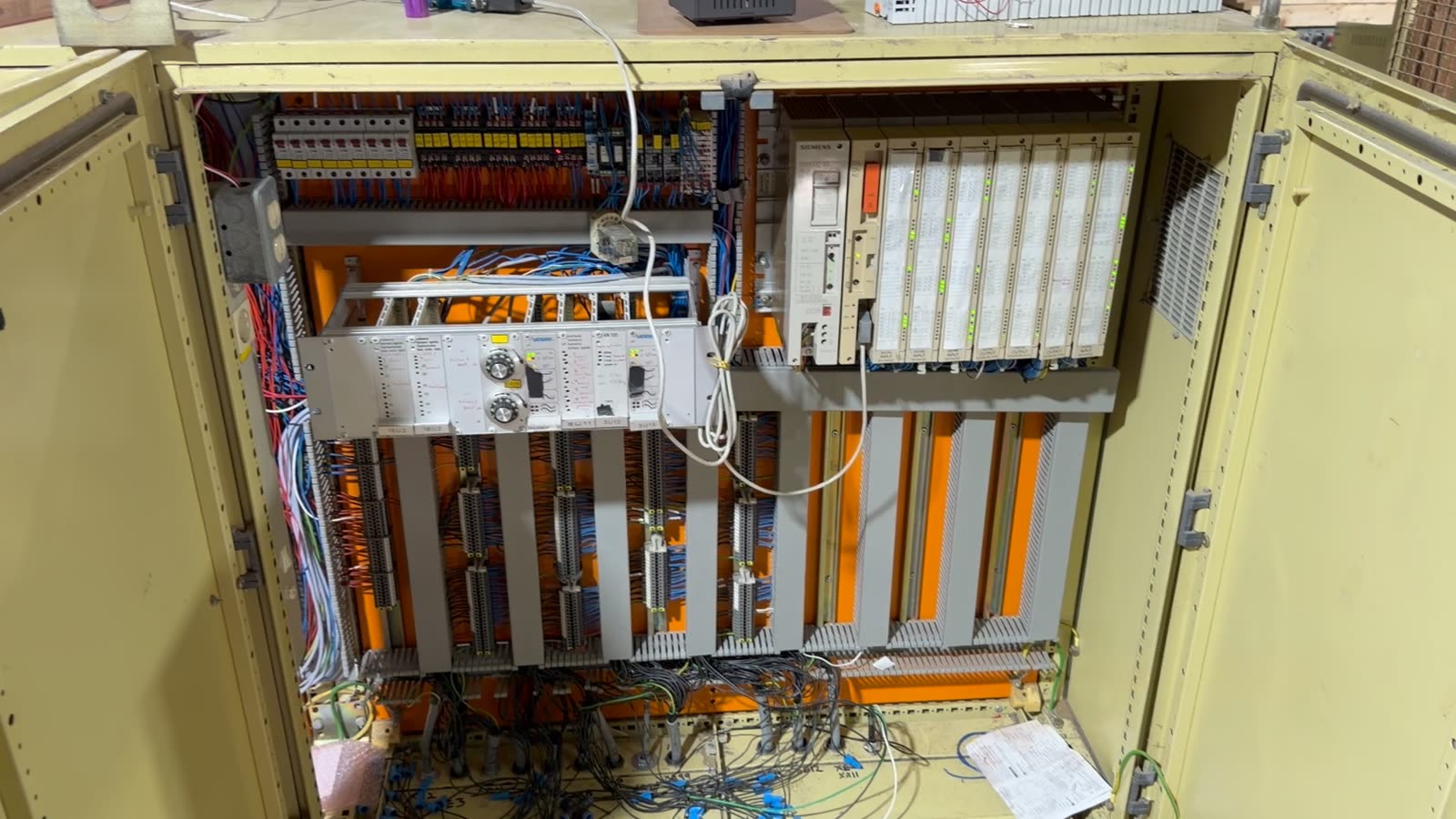
A 1991 Siemens S5, replaced in one 8-hour cutover
CureWood's vertical finger-jointing line, with two cutting spindle stations, cleanup and trim saws, a hydraulic press, a dozen motors and VFDs, and 189 hardwired I/O points, moved to Cortex with about three hours of human engineering. It ran right on the first try.
Your machine here
Tell us about your machine and what you want to automate. Apply for a pilot, then book time with the founders.
The whole control stack.
One box, one browser tab.
Every Cortex serves its own IDE: nothing to install, works fully air-gapped.
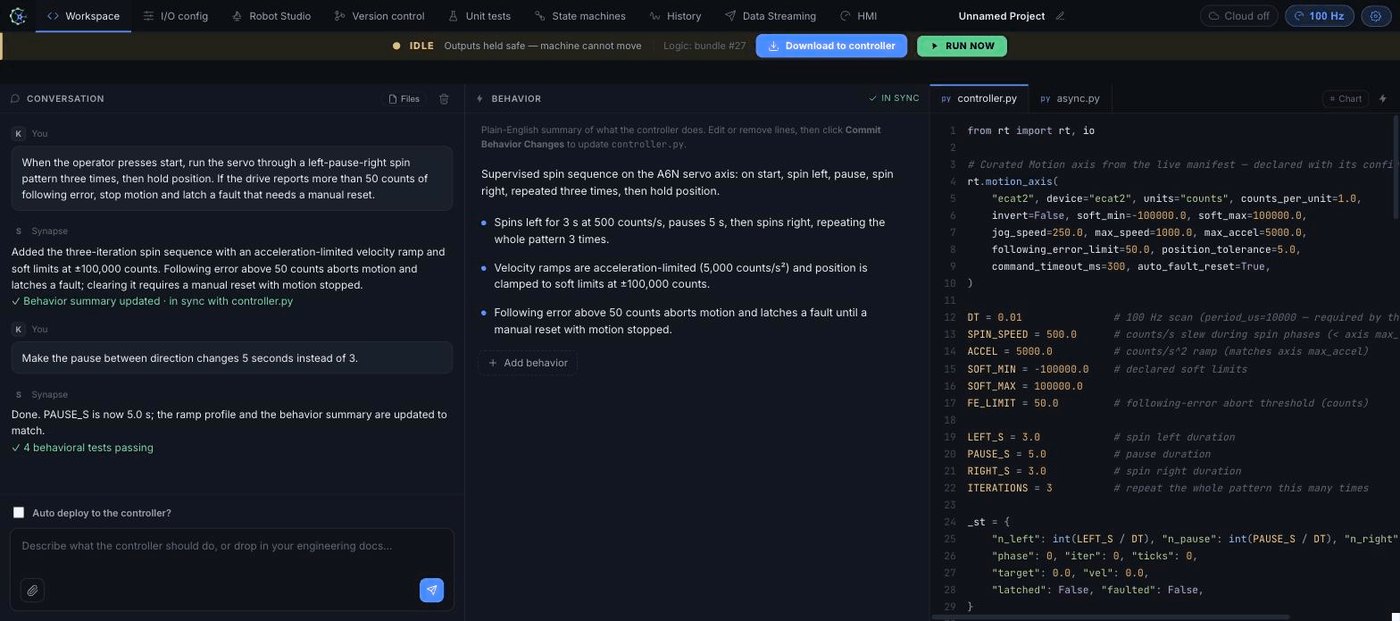
Describe the behavior. Get real-time code you can read.
The Workspace is a conversation with your controller. State a
requirement in plain English; Synapse writes deterministic
real-time Python, a scan-cycle controller.py
plus an event-driven supervisor, and keeps a readable behavior
summary in sync. Before generating logic, it flags ambiguities
and prompts you to resolve them: a safety pass over the edge
cases and interlocks you haven't specified yet.
- First logic in minutes, in a browser. No 2 GB vendor IDE, no dongle, no ladder dialect from the nineties.
- Ordinary, auditable Python: hand-tune any line when you need to be exact.
- One-click deploy verifies the cycle-time budget on target before it pushes.
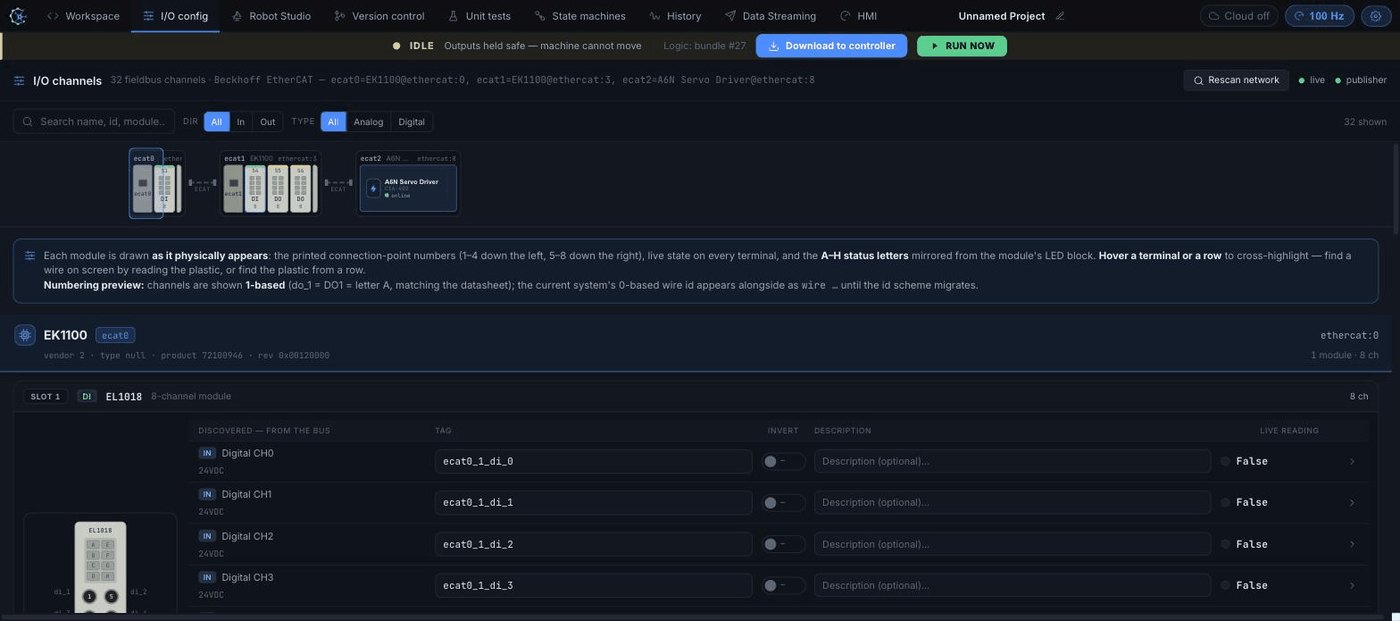
Your wiring, discovered and drawn as it's actually installed.
Cortex scans the fieldbus and renders every module as it physically appears: printed terminal numbers, live state on every point, status letters matching the LED block. Hover a terminal to find the wire on screen; hover a row to find it on the module. Rename channels, set engineering units and calibration inline, and watch commands round-trip with a real hardware acknowledgement.
- Commissioning without the spreadsheet: the drawing on screen matches the panel in front of you.
- Tag names become the vocabulary the AI programs with. Label the plant once, use it everywhere.
- EtherCAT, TCP/IP-based field bus, and Modbus TCP reach ~99% of third-party I/O.
The robot is just another device on your controller.
Discover a supported arm on the fieldbus subnet and Robot Studio lights up: discrete jog, Cartesian moves, trajectory playback, and fault recovery, all driven by the same controller that runs the rest of the cell.
- No separate teach-pendant ecosystem to license, learn, and integrate against.
- Arm and process share one program, one I/O namespace, and one test bench, so interlocks live in one place, not across a fieldbus bridge.
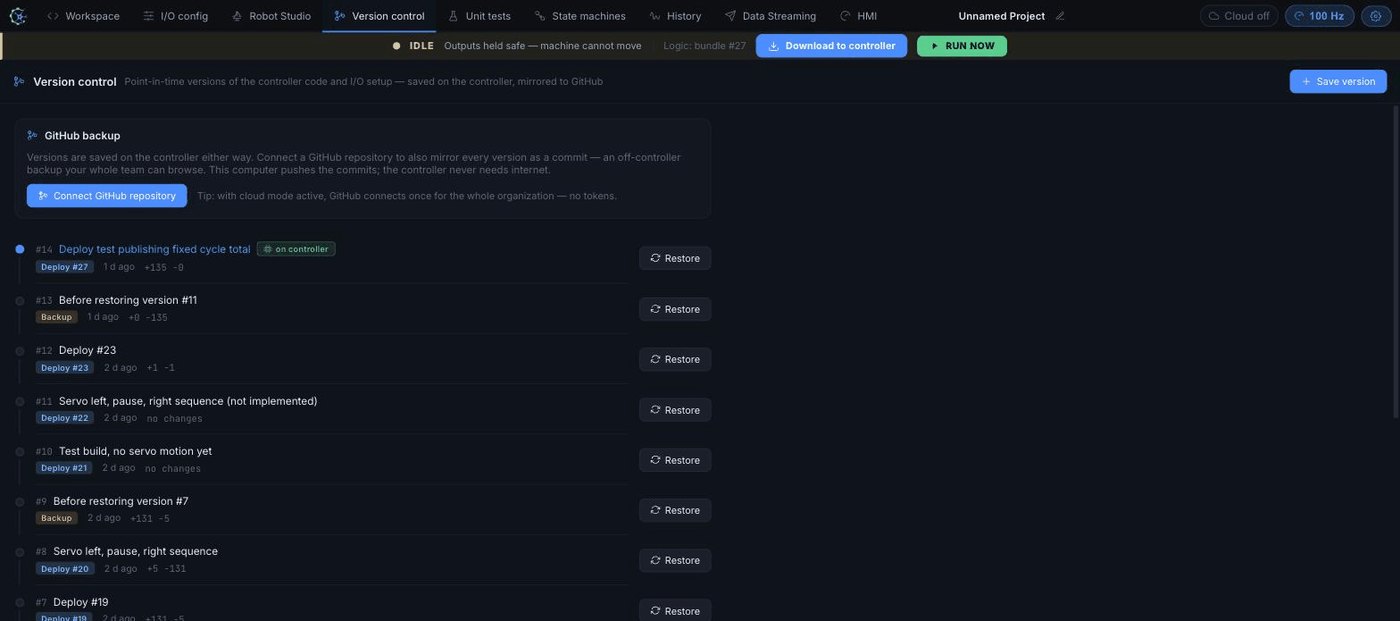
Every deploy, snapshotted on the box. Restore in one click.
Each version captures the code and the full I/O setup: tags, units, calibration, all in a point-in-time snapshot versioned with Git on the controller itself. It works completely air-gapped. Connect a GitHub repository and every version also mirrors as a commit your whole team can browse.
- "What changed since Tuesday?" has an answer on the machine, not in someone's laptop folder.
- Restore is point-in-time and non-destructive: the running bundle is untouched until you deploy.
Prove the behavior before the line ever runs it.
Every behavior in the summary becomes a test. Synapse drives the relevant input with a synthetic waveform, holds everything else as preconditions, and runs your actual controller.py in a simulator, asserting that the output lands within a bounded window of scan cycles. The same assistant that wrote the code writes and maintains the test specs.
- Verification is the deploy gate: you see pass/fail per behavior before you trust the machine with it.
- Tests are timed in scan cycles, the way control engineers actually reason about response.
Your machine's modes, visible instead of buried in rungs.
State machines are first-class in the runtime: named states, guarded transitions, and per-state timeouts in a few lines of Python. Synapse draws the diagram as you type and monitors it live, with a flight recorder of every transition, so "why did it fault at 2 a.m.?" is a lookup, not an archaeology project.
- Process structure is explicit, reviewable, and testable, not implied by scattered bits.
- Live state and transition history stream into the built-in historian.
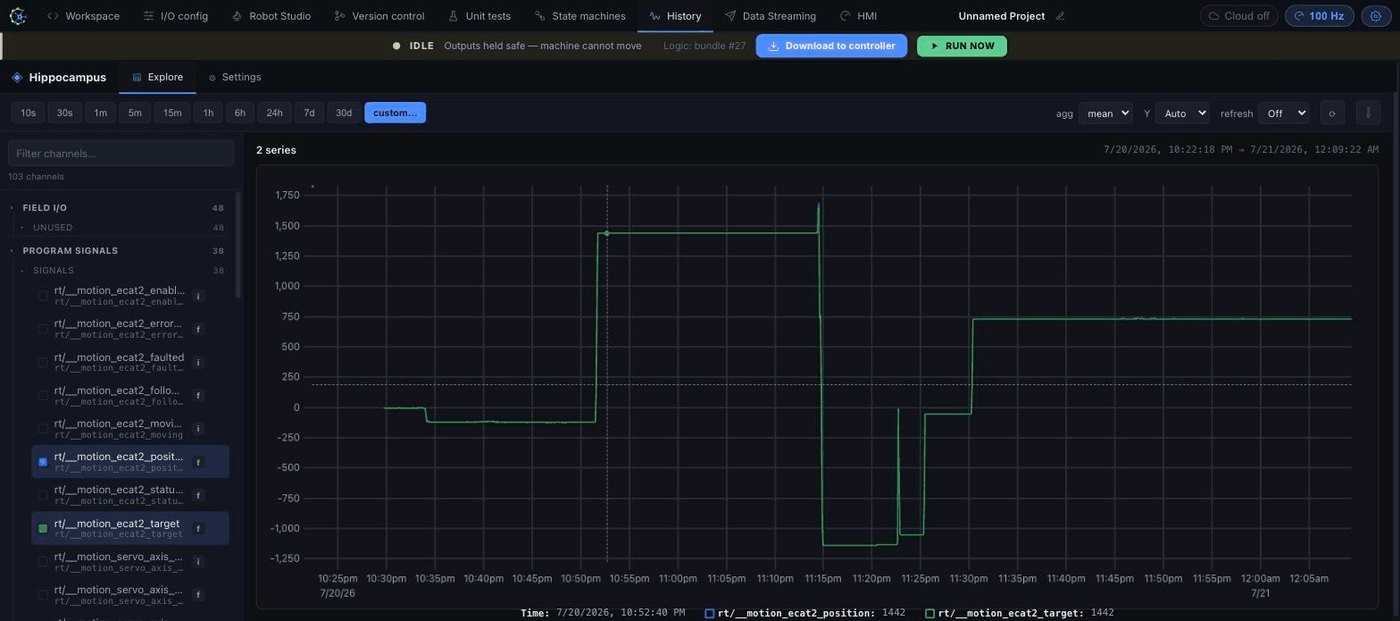
A full historian, built into the controller.
Hippocampus, the on-device data store, captures field I/O, per-cycle program signals, and system state at full rate, then lets you explore it in the browser: pick channels, drag to zoom, watch live values stream in.
- No third-party historian license, no per-tag pricing. On-prem by default, on hardware you own.
- Commissioning, tuning, and incident forensics use the same tool operators already have open.
Your data, in your schema, on your broker.
Stream live measurements to the systems you already run: forward natively to InfluxDB, publish MQTT in your own schema, serve or consume OPC UA, and speak ROS 2 topics and Zenoh out of the box.
- No protocol-gateway boxes, no "unlock OPC UA" upcharge. Open egress is the default.
- Egress is decoupled from the control core: a slow broker can never stall the machine.
Upload your real P&ID. It becomes the operator screen.
Drop in the drawing you already have. It stays exactly as drawn, and Synapse pins live readings onto every tagged component. Typed elements get industry state cues: valves go green when open, rotating equipment spins while running. Commandable elements actuate from a tap, with server-side validation on every write. The same screens drive a full-screen operator kiosk mode on any display.
- Operator screens without an HMI-package license, or redrawing your plant in a vendor editor.
- The P&ID your engineers stamped is the interface your operators touch.
One platform.
Two configurations.
Cortex Mini and Cortex run the same Synapse software. They differ in real-time performance, connectivity, and certifications.
Cortex Mini
Coming Q1 2027
Soft real-time control for machines, skids, and retrofits. The full AI-native stack in its smallest form.
Cortex
Coming Q2 2027
Hard real-time with integrated motion, four Ethernet ports, and a 4 kHz control loop, for the lines that can't blink.
A $50 deposit per controller reserves your pre-order and counts toward the hardware price. The remaining balance is due before shipping. Launch windows are estimates. Want to try Cortex first? Apply for a pilot — no deposit required.
Product specifications.
| Feature | Cortex Mini | Cortex |
|---|---|---|
| Max scan rate | 1000 Hz | 4000 Hz |
| Max jitter | 10 µs | 2.5 µs |
| P99.9 jitter | 3 µs | 0.5 µs |
| Real-time class | Soft real-time | Hard real-time |
| Display | Yes | Yes |
| Camera | Yes | Yes |
| TCP/IP-based field bus | Yes | Yes |
| EtherCAT | Yes | Yes |
| Modbus TCP | Yes | Yes |
| HMI support | Yes | Yes |
| Serial (CAN, RS485/RS422/RS232) | Yes | Yes |
| Motion | EtherCAT only | Integrated motion |
| GigE Vision | Yes | Yes |
| Synapse IDE | Included | Included |
| Ethernet ports | 2× multi-purpose | 2× IT · 2× OT |
| Data protocols | MQTT, OPC UA, REST, ROS 2 Topics, Zenoh, gRPC | |
| Database support | InfluxDB, any ODBC SQL database | |
| USB data logging | Yes | Yes |
| Certifications | UL + CE (planned) | UL + CE (planned) |
| Compute | ||
| CPU | ARM A72 Quad + A53 Quad | ARM A72 Quad + A53 Quad |
| GPU | Mali-G52 MC3 | Mali-G52 MC3 |
| NPU | 6 TOPS | 6 TOPS |
| Memory | 4 GB | 8 GB |
| Storage | 32 GB · expandable to 1 TB | 64 GB · expandable to 1 TB |
Specifications reflect current production targets and are subject to change.
Cloud History Starter
$100/month per controller. Keep your controller history available to your team through Hippocampus and the Neuron Python API.
- 50 GB of online history storage per controller
- 20 GB monthly download allowance
- 2 simultaneous queries per controller
- Organization member access, API keys, and pandas-ready query results
Each subscription is assigned to one controller. Contact us for additional storage or compute.
Two engineers rebuilding the control stack.
Neuron Industries was founded in 2026 by Dennis Ren and Kenneth Rhee. Hardware, runtime, IDE, and cloud are built under one roof in El Segundo, California. Backed by Y Combinator (S26).
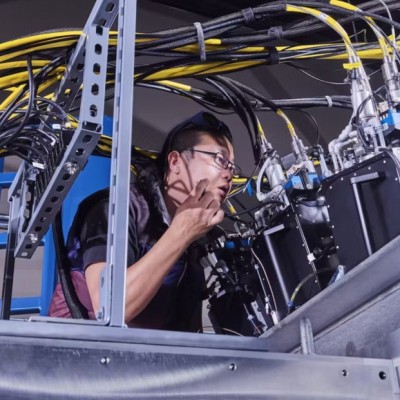
Dennis Ren
Founding electrical engineer at Freeform: FPGA real-time controls and in-house PLC-replacement I/O for an autonomous metal 3D-printing factory. Before that, Apple's Vision Pro founding System EE team, Amazon Go, and Tesla Fremont. UC San Diego BSEE.
Full bio
Kenneth Rhee
Founded and bootstrapped WorkIPO, which built ERP and MES systems for industrial clients. Before that, Amazon (Elastic Block Store, Silk browser) and GOAT Group marketplace systems. UC Irvine computer science.
Full bioThe Cortex AIC, in plain terms.
What is the Cortex AIC?
The Cortex AIC is an AI-native industrial controller made by Neuron Industries that works in place of a PLC. One device runs the control logic and serves the Synapse IDE, the operator HMI, a full-rate historian, and data streaming, all with zero software or runtime licenses.
Does the Cortex AIC replace a PLC?
Yes. Cortex replaces the PLC, the HMI package, the historian, and the vendor IDE in one box. It speaks EtherCAT, PROFINET, Modbus TCP, and serial fieldbuses, so existing sensors, drives, and I/O stay in place.
How is the Cortex AIC programmed?
Describe the machine's behavior in plain English and Neuron's AI agent turns it into deterministic, real-time Python you can read, test, and own. Every change passes behavior simulation and unit tests before deploy, and the whole toolchain runs in a browser tab served from the controller itself.
Who founded Neuron Industries?
Neuron Industries was founded in 2026 by Dennis Ren (co-founder and CEO), previously founding electrical engineer at Freeform and a founding member of Apple's Vision Pro System EE team, and Kenneth Rhee (co-founder and CTO), previously at Amazon and GOAT Group and founder of WorkIPO. The company is based in El Segundo, California, and is part of Y Combinator's Summer 2026 batch.
How much does the Cortex AIC cost?
Cortex Mini is $2,950 and Cortex is $6,450. Both are one-time hardware prices with zero software, runtime, or per-seat licenses. The on-device Synapse IDE, HMI, historian, and data streaming are included. Optional Cloud History Starter is $100/month per controller with 50 GB of online storage.
When can I get a Cortex?
Cortex Mini is coming Q1 2027 and Cortex is coming Q2 2027. Apply for a pilot at no cost. A $50 deposit per controller reserves a pre-order and is applied toward the hardware price. Launch windows are estimates.
Does the Cortex AIC work air-gapped?
Yes. Every Cortex serves its own IDE and HMI locally and stores history on the device, so the whole stack works with no internet connection. Cloud connectivity is optional.
Ideas behind the machines.
Our thinking on engineering, stories from the field, and what others are saying about Neuron.
Explore Press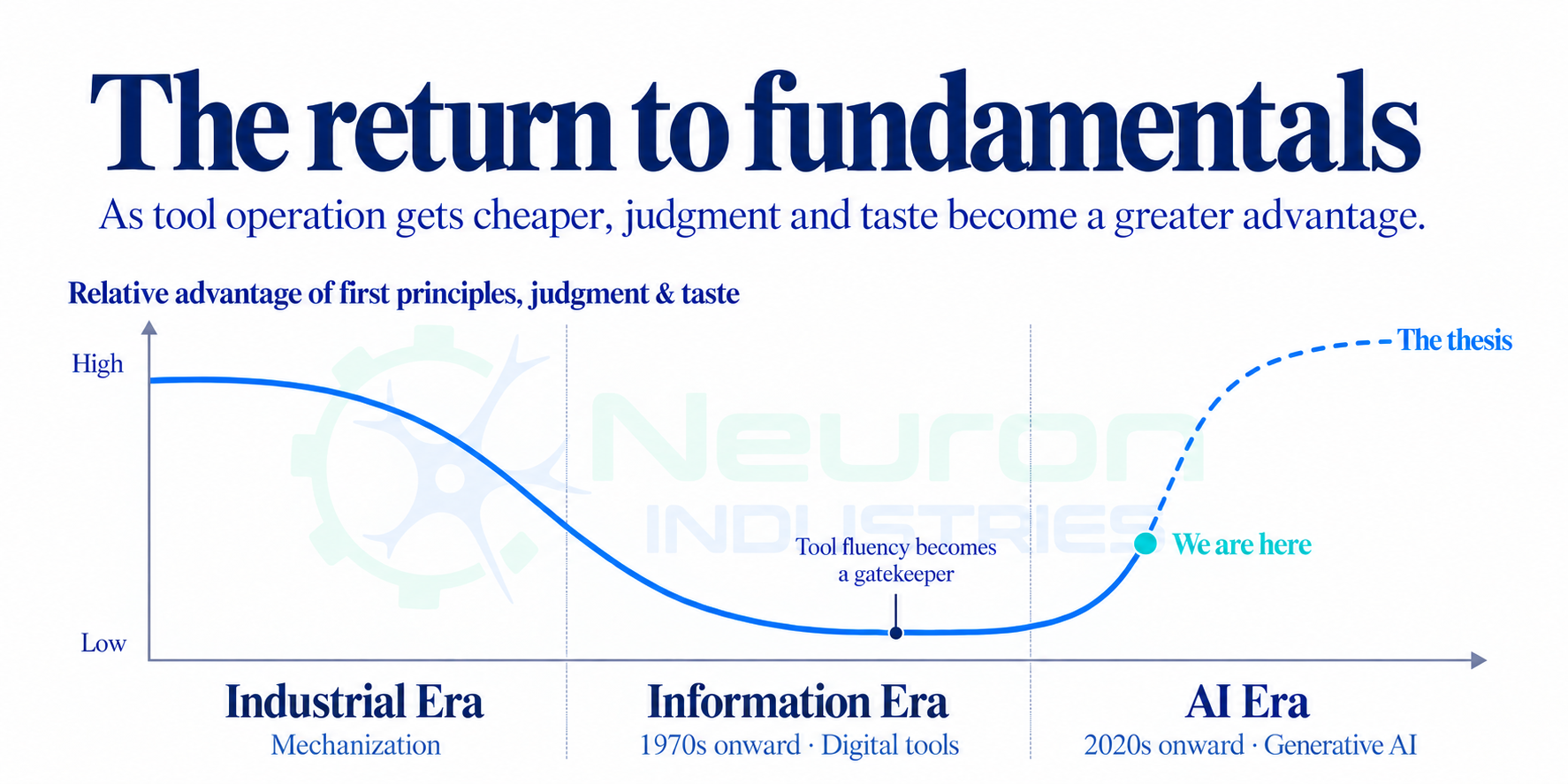 Latest essay / Dennis RenEsotericism Is Dead. ↗Why agents will change what it means to be an expert in engineering software.
See Cortex on your process.
Tell us about your company and the machine or process you want to control. Apply for a pilot, then book a call so we can discuss your application. Cortex Mini is coming Q1 2027; Cortex is coming Q2 2027.
Apply for a pilot · Pre-order with a $50 deposit
Prefer email? hello@neuronindustries.com